
By Ivo Kostadinov · Founder, SaveMyBudget
· 4 min read
How do I get a refund for invalid clicks on Google Ads?
Short answer
Google credits invalid activity it finds after billing automatically. For clicks you believe are invalid that haven't been credited, you can ask Google to investigate activity from the last 60 days using its click quality contact form. Google reviews the evidence and decides. Approved amounts appear as "Invalid activity" credits on your account, not as a payment to your card. Google says reviews typically take several business days.
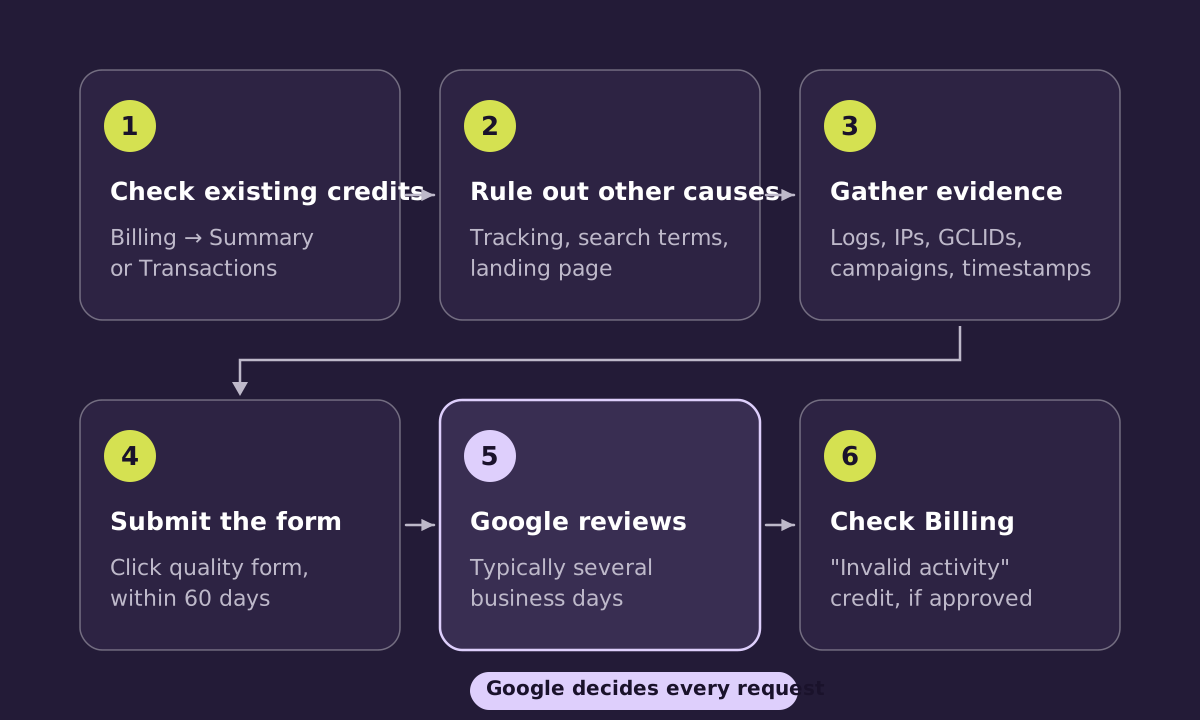
Step 1: Check what Google has already credited
Go to Billing, then Summary or Transactions, and look for "Invalid activity" adjustments. For Search and Performance Max campaigns, the Invalid Activity Credit Report in Report Editor breaks credits down by campaign. Don't ask Google to review clicks it has already credited. It wastes everyone's time and weakens the request.
Step 2: Rule out other explanations
Broken tracking, a landing page change or a surge in broad-match traffic can all look like invalid clicks. Poor targeting or a low conversion rate isn't invalid activity on its own. Our guide on clicks with no sales covers the usual suspects.
Step 3: Gather evidence
Google asks for specifics it can check against its own records. That includes your 10-digit customer ID, the date range, affected campaigns and keywords, and web server logs with IP addresses, devices and GCLIDs. Our guide to what evidence Google needs lists every field and how to get it.
Step 4: Submit the click quality form
Use Google's click quality contact form from within the Google Ads help centre. Keep the summary short and factual: what pattern you saw, when, on which campaigns, and what the logs show. Describe what happened rather than guessing who did it.
Step 5: Wait for Google's review
Google says the process typically takes several business days. It may not share detail on how it reached its decision, because that information could help bad actors get around its defences. That's a reasonable trade-off, and it's worth accepting.
Step 6: Check the outcome in Billing
If Google finds invalid activity, the credit appears as an "Invalid activity" adjustment in Billing and on your invoice. It may cover everything you raised, part of it, or none. A declined request isn't a judgement on you. Often it means the evidence wasn't enough to separate those clicks from normal traffic.
Tips that make a request easier to review
- One clear pattern per request, rather than a mixed list of everything that looked odd.
- Exact timestamps with the time zone stated.
- GCLIDs, which let Google match your records to specific ad clicks.
- No clicks Google has already credited.
- A courteous, factual tone. The people reviewing it are on your side of the problem.
How SaveMyBudget handles this
Our tag records click and session metadata from the day it's installed. When a cluster of flagged clicks has enough evidence, our claims team prepares the pack, reviews it and files it through Google's official process. Google decides every claim. We charge 25% of credits Google confirms from claims we file, and nothing if Google declines.
Frequently asked questions
Will I get cash back to my card?
Normally no. Google applies approved amounts as invalid activity credits on your Google Ads account or invoice, which reduce what you pay.
Can I request a refund for clicks older than 60 days?
No. Google's investigation requests cover roughly the last 60 days only. Google issues automatic credits separately, and you don't need to request them.
Does filing a request hurt my account?
No. Google provides the click quality form for exactly this purpose.
How long does it take?
Google says typically several business days. Complex cases can take longer.
Sources
Let us prepare the file. SaveMyBudget collects the evidence from your site, and our claims team prepares and files claims for Google to review. No fee unless Google confirms a credit from a claim we file.
Protect my ad budgetNo win, no fee · No card to start · Setup in about a minute