
By Ivo Kostadinov · Founder, SaveMyBudget
· 3 min read
How far back can I claim invalid clicks?
Short answer
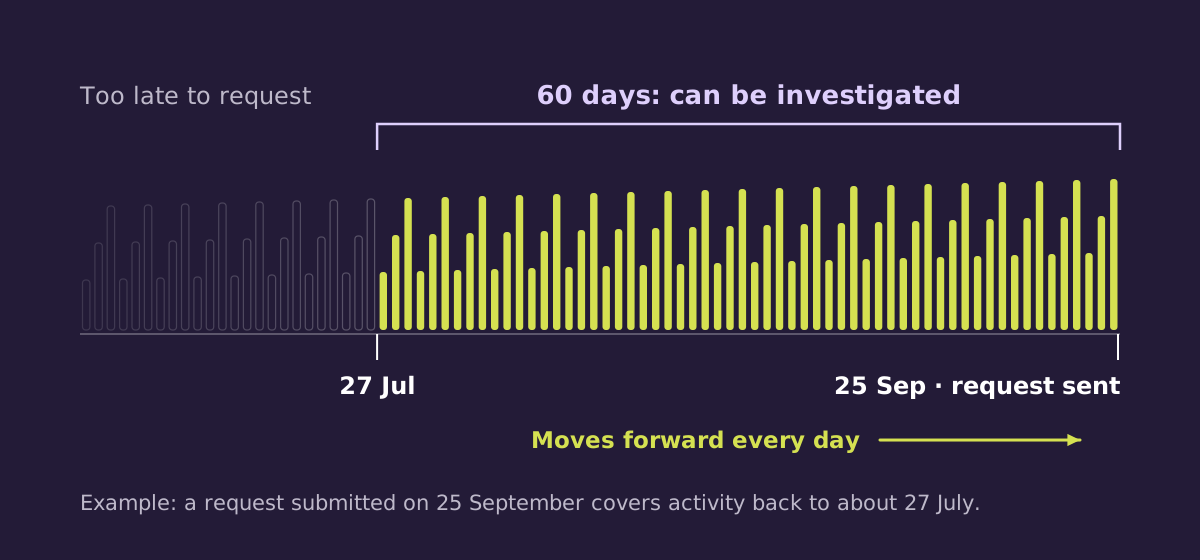
About 60 days, counted back from the day you submit your request. The window slides forward every day, so clicks from 61 days ago can no longer be investigated through a request, whatever evidence you have. Google issues automatic invalid activity credits separately, and you don't need to request them.
How the window works
Google's help pages say you can request an investigation into suspected invalid activity from the last 60 days. The start of the window is set by the day you submit, not the day the clicks happened. Every day you wait, the oldest day of activity falls out of reach.
A worked example
If you submit a request on 25 September, the window reaches back to about 27 July. Clicks from 20 July are already outside it. If you wait until 10 October to submit, the window starts around 11 August, and another two weeks of activity have dropped out.
What the window doesn't cover
- Google's automatic credits. Invalid activity that Google identifies itself is credited in later billing cycles on its own schedule. You don't need to request it.
- Clicks filtered before billing. These were never charged, so there's nothing to reclaim.
Your records need to exist first
The window is only useful if you have records for it. Check three things:
- Server log retention. Many hosts keep logs for 7–30 days. If yours rotate quickly, archive them or use a tag that stores click records.
- GCLID capture. Make sure landing page URLs, including the GCLID, are recorded for each paid visit.
- Analytics settings. Check how long your analytics tool keeps event-level data. Short retention can limit detailed reports on older visits.
A tracking tag only records from the day it's installed. It can't reach back in time. Our guide on what evidence Google needs explains which records matter most.
A routine that fits the window
Review traffic quality once a month and submit anything worth raising straight away. That keeps every request comfortably inside the window, with time to spare if Google asks for more detail.
Frequently asked questions
Is it 60 days or two months?
Google says 60 days. Count days rather than calendar months to be safe.
Does the window pause while Google reviews my request?
Google's help pages don't say. Submit promptly so that all the activity you raise is inside the 60 days.
Can I submit several requests?
Yes. Separate requests for separate patterns are often clearer than one large request.
Sources
Keep today's spend claimable. The SaveMyBudget tag starts recording the day it goes live. Setup takes about five minutes through Google Tag Manager or our Shopify app.
Protect my ad budgetNo win, no fee · No card to start · Setup in about a minute