
By Ivo Kostadinov · Founder, SaveMyBudget
· 5 min read
Am I paying for fake clicks on Google Ads?
Short answer
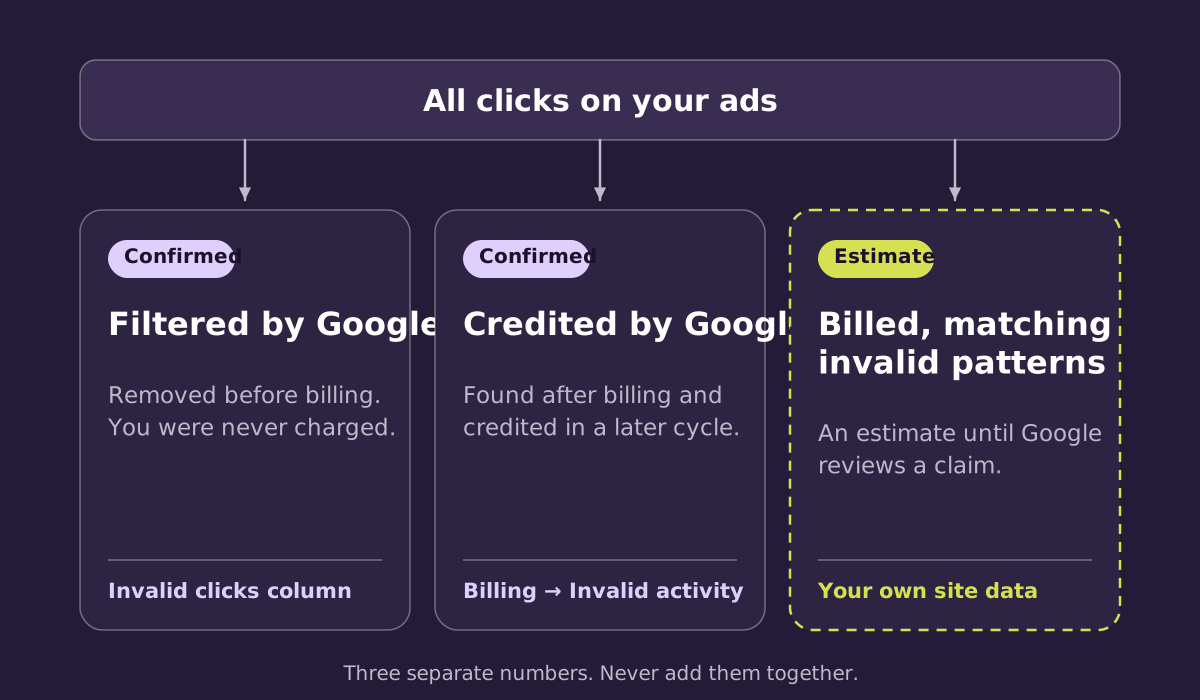
Probably some, and probably less than you fear. Google filters invalid clicks it detects before you are billed, and credits invalid activity it finds afterwards. A share of billed clicks can still match invalid patterns. Industry estimates vary widely. Only your own account can tell you. The checks below take about ten minutes.
What counts as a fake click
Google's term is invalid clicks: clicks that "don't represent a genuine interest in your business". It groups them three ways:
- Automated traffic: bots, scripts and other automated tools.
- Manual clicks: people clicking to run up your costs or inflate a publisher's earnings.
- Accidental clicks: clicks with no value to you, often caused by poor ad placement.
Not every invalid click is malicious. A mis-tap on a phone counts. So does a price-comparison crawler that follows an ad link. The question for your budget is simply whether you were charged for it.
What Google already does for you
Google runs a dedicated Ad Traffic Quality team that uses automated filters, machine learning and manual review to keep invalid activity out of its ad systems. For advertisers, this works in two ways:
- Filtered before billing. Invalid clicks Google detects are removed before they reach your bill. You are not charged for them, and they don't appear in your click totals. You can see how many were filtered in the Invalid clicks column.
- Credited after billing. When Google identifies invalid activity after you've been billed, it issues an invalid activity credit in a later billing cycle, "where appropriate and possible".
This protection runs on every account with no setup. It is the main reason most advertisers never need to think about invalid traffic at all.
Where a gap can remain
Google has to judge each click from its own side: the network it came from, its timing, and how it compares with patterns across millions of accounts. It works hard to do this without false positives, because blocking a real customer costs you a sale.
What happens after the click happens on your site. Did the page load? Did anyone scroll or move a mouse? Did the same click ID arrive three times? Your site can see these things. Google can't see them in the same detail. That is why a small share of billed clicks can look fine at the click and odd once they land. It's also why Google lets advertisers ask for a review.
Check your own account in ten minutes
- Look at the Invalid clicks column. On the Campaigns page, add the Invalid clicks and Invalid click rate columns. This shows what Google filtered before billing, which tells you how much invalid activity your campaigns attract. Our guide on where to see invalid clicks in Google Ads shows every place to look.
- Check Billing for invalid activity adjustments. Go to Billing, then Summary or Transactions, and look for lines labelled "Invalid activity". These are credits Google has already issued.
- Compare ad clicks with site sessions. In your analytics, paid sessions should roughly track paid clicks. A big, sudden gap on one campaign is worth a closer look.
- Look at engagement from paid traffic. Watch for clusters of sessions under a second, no scrolling, or visits from countries you don't target.
- Read your leads. Nonsense form fills that arrive in bursts from paid traffic can point to automated activity.
Signs that are usually not fraud
Most "my ads feel off" moments have ordinary causes. Check these first:
- Conversion tracking broke. A theme update, a new checkout or a consent banner change can stop sales being recorded while they keep happening.
- Search terms drifted. Broad match can pick up searches that are only loosely related to what you sell.
- Seasonality or competition. CPCs rise when competitors raise bids, and demand dips in quiet months.
- Network settings. Search Partners, Display and Performance Max placements behave differently from Google Search.
We walk through each of these in why Google Ads get clicks but no sales.
If something does look wrong
Write down what you saw, with dates, campaigns and numbers. If it points to invalid activity you were billed for, you can ask Google to investigate activity from the last 60 days. Our guides on how to get a refund for invalid clicks and what evidence Google needs cover how to do that well.
Frequently asked questions
Does Google make money from invalid clicks?
Google doesn't charge for the invalid clicks it filters, and it credits invalid activity it identifies after billing. Advertiser trust is central to its business, which is why it invests heavily in traffic quality. When a billed click looks invalid to you, the practical step is to ask Google to review it.
Can a competitor click on my ads?
They can, and Google treats deliberate clicks to run up your costs as invalid. Repeated clicks from the same source are among the patterns Google's systems look for. If you suspect it, record the dates, times and campaigns involved.
How much invalid traffic is normal?
There is no single figure. It varies by industry, keyword, network and country. Your own account's Invalid click rate column is a better starting point than any benchmark.
Should I pause my campaigns?
Rarely. Pausing stops the invalid clicks and the real customers together. Check tracking and settings first, then gather evidence and raise it with Google if needed.
Sources
See your own numbers. SaveMyBudget adds a lightweight tag to your site and flags billed clicks that match invalid patterns, with the reason on every line. Where the evidence supports it, we prepare a claim for Google to review. No fee unless Google confirms a credit from a claim we file.
Protect my ad budgetNo win, no fee · No card to start · Setup in about a minute