
By Ivo Kostadinov · Founder, SaveMyBudget
· 3 min read
Where do I see invalid clicks in Google Ads?
Short answer
In four places. The Invalid clicks and Invalid click rate columns on the Campaigns page show what Google filtered before billing. Billing → Summary or Transactions shows "Invalid activity" credits issued after billing. The Invalid Activity Credit Report in Report Editor breaks those credits down by campaign for Search and Performance Max. Your invoice can list late invalid traffic credits too.
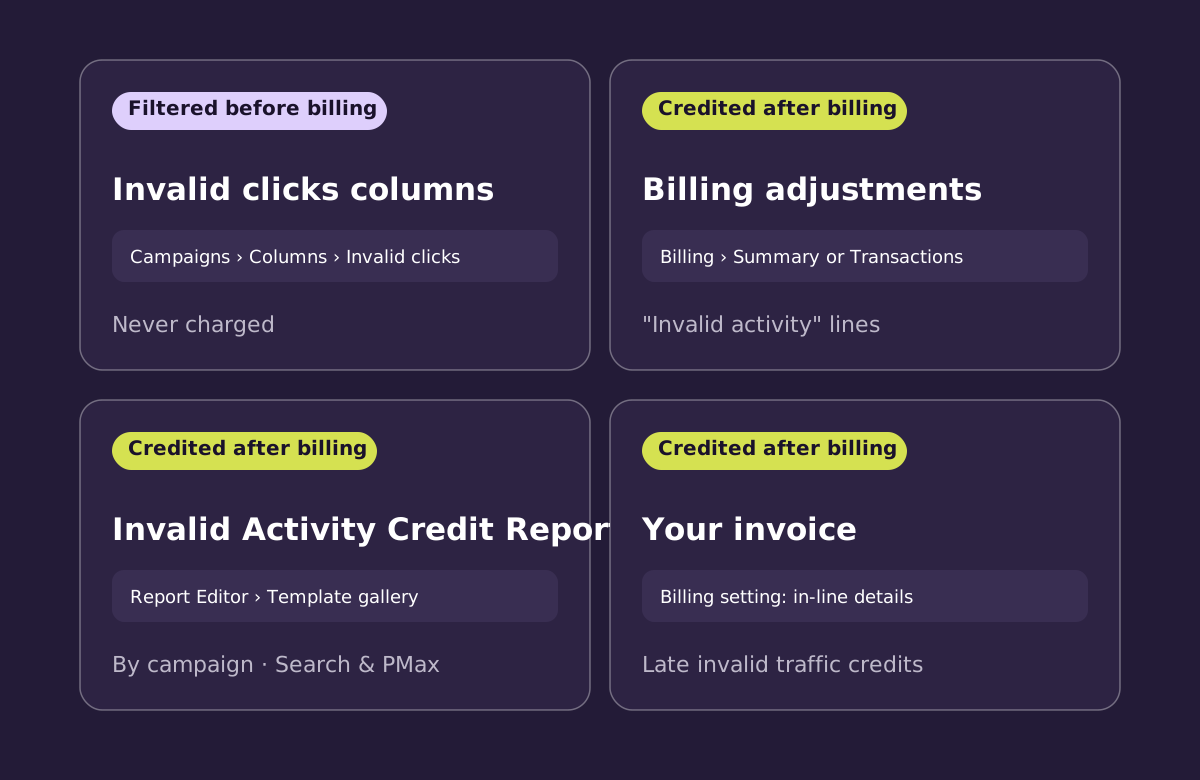
1. The Invalid clicks columns
- Go to Campaigns.
- Click the Columns icon above the table.
- Search for "Invalid clicks" and tick Invalid clicks and Invalid click rate.
- Click Apply.
These columns show clicks Google classified as invalid and filtered automatically. You weren't charged for them, and they don't count in your other statistics. They're available on the Campaigns page, not at ad group level.
2. Billing: invalid activity adjustments
Click the Billing icon, then Summary. You can also check Transactions or Billing activity. Lines labelled "Invalid activity" are credits Google issued for invalid activity it found after you'd been billed. They include details such as the original invoice, service month and campaign.
3. The Invalid Activity Credit Report
In Report Editor, open the template gallery and choose Invalid Activity Credit Report: Search & PMax. It shows credited clicks and amounts by campaign and network, plus adjusted cost, clicks, CPC and cost per conversion after credits. It's the clearest way to see what your campaigns really cost.
4. Your invoice
Google offers a billing setting for how late invalid traffic credits appear on invoices: either with in-line invalid activity details or without them. If you reconcile invoices for a finance team, choose the in-line option so the credits are visible.
What these numbers do and don't tell you
| Where | What it shows | Were you charged? |
|---|---|---|
| Invalid clicks column | Clicks Google filtered | No, never billed |
| Billing adjustments | Credits after billing | Yes, then credited |
| Credit report | Credits by campaign | Yes, then credited |
| Invoice | Late credits (if shown) | Yes, then credited |
None of these shows billed clicks that nobody has flagged yet. That's where your own site data comes in. Our guide to whether you're paying for fake clicks explains how to check.
Frequently asked questions
Why is my invalid click rate high?
A high rate means Google is filtering a lot of invalid traffic before you're billed. That's the protection working. Look at which campaigns and networks it comes from, as it can point to placements worth reviewing.
Why do I see more conversions than clicks?
Google notes this can happen rarely. Invalid clicks can be filtered out after the fact while valid conversions stay recorded.
Can I see which IP addresses Google filtered?
No. Google keeps detection details confidential so that bad actors can't learn how to get around its defences.
Sources
- Google Ads Help — About columns in your statistics table
- Google Ads Help — About invalid traffic
- Google Ads Help — Understanding credits and adjustments
- Google Ads Help — About the Invalid Activity Credit Report
- Google Ads Help — Late invalid traffic credits invoice display settings
- Google Ads Help — Invalid clicks
Add the missing view. SaveMyBudget shows billed clicks that match invalid patterns next to Google's filtered and credited numbers. We keep the three separate and clearly labelled.
Protect my ad budgetNo win, no fee · No card to start · Setup in about a minute